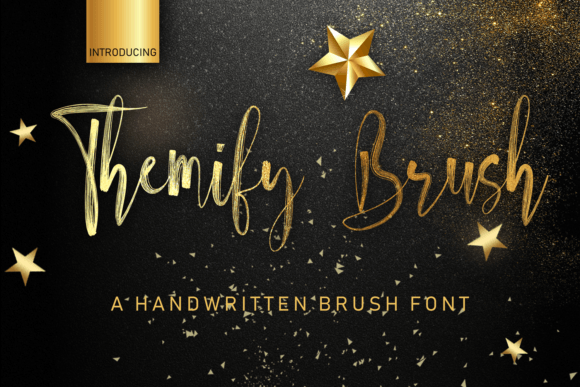
Themify Brush: A Handwritten Font for Creative Web Design
As a web designer, I’m always on the lookout for fonts that bring personality to digital spaces without sacrificing clarity. Themify Brush has quickly become one of my go-to choices when I want to add a touch of warmth and authenticity to a website’s visual identity.
Testing Themify Brush in a Hero Section
I first tested Themify Brush in a hero section for a boutique online store. The font’s casual, brush-stroke style gave the headline a friendly, approachable feel that matched the brand’s aesthetic. It stood out against a bold background without overwhelming the design. On desktop, it looked crisp and readable, and on mobile, it scaled well without losing its character.
One thing I noticed was how the font’s slight irregularities made it feel more human—like a real hand had written the text. This is perfect for brands that want to convey a sense of craftsmanship or personal touch.
Using Themify Brush for Call-to-Action Buttons
I also experimented with using Themify Brush for call-to-action buttons on a product landing page. The font’s unique shape and flow worked well for short phrases like “Shop Now” or “Join the Community.” It added a playful element that contrasted nicely with the clean, modern sans serif used for body copy.
However, I found that it wasn’t ideal for long button labels. The font’s quirks can make it harder to read at smaller sizes, so I recommend keeping CTA text short and simple when using this typeface.
Pairing Themify Brush with a Clean Sans Serif
When working on a portfolio website, I paired Themify Brush with a sleek sans serif for headings and subheadings. The combination created a balanced look—clean enough for readability but with just enough flair to stand out. It was especially effective for section titles and project descriptions, where a bit of personality could enhance the storytelling without distracting from the content.
This pairing also helped maintain visual hierarchy. The handwritten font drew attention to key areas of the site, while the sans serif provided a stable base for the rest of the layout.
Applying Themify Brush to Landing Page Headlines
On a course sales page, I used Themify Brush for the main headline. The font’s organic, slightly uneven lines gave the text a handmade feel that aligned with the instructor’s brand. It felt more inviting than a standard display font, which made the offer feel more personal and trustworthy.
For the subheadline, I switched to a simpler serif font to keep the design grounded. This contrast helped guide the user’s eye through the page while maintaining a cohesive look.
Considerations for Responsive Design
When designing for different screen sizes, I made sure to test Themify Brush on both large monitors and small mobile devices. On larger screens, the font looked great as a primary heading, but on smaller devices, I reduced the font size slightly to ensure legibility.
It also performed well over image backgrounds. The font’s light weight and subtle variations allowed it to pop without clashing with the visuals behind it. This makes it a good choice for banners, overlays, and other graphic elements that need to stand out.
Best Uses for Themify Brush in Web Projects
Themify Brush excels in areas where a personal, creative touch is needed. It works best for:
- Hero section headlines
- Call-to-action buttons
- Section titles and subheadings
- Portfolio project names
- Brand logos and taglines
- Decorative accents in UI elements
It’s not the best choice for long paragraphs or dense text blocks, especially in navigation menus or form fields. For those cases, a more structured, easy-to-read font is preferable.
Font Pairing and Accessibility
When using Themify Brush in web projects, it’s important to consider accessibility. While the font is visually appealing, it may not be the best option for users who rely on screen readers or have visual impairments. In such cases, pairing it with a more readable font ensures that the content remains accessible without sacrificing style.
For commercial use, I always check the licensing details before integrating any font into a client’s website. Themify Brush offers clear terms for web use, making it a reliable choice for designers working on online stores, marketing campaigns, or digital branding projects.