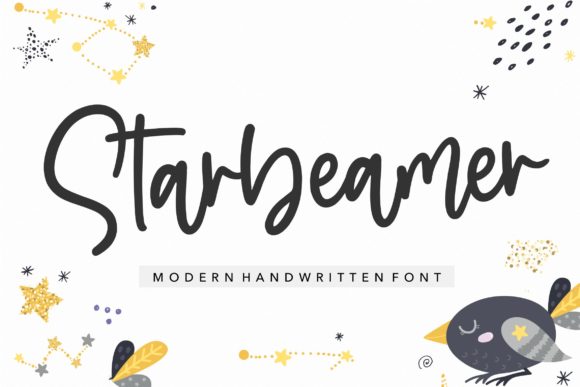
Starbeamer: A Quirky Handwritten Font for Web Design
While working on a boutique online store project, I found myself searching for a font that could bring a personal touch to the brand’s digital presence. Starbeamer, a unique handwritten script font, caught my eye. Its friendly and playful style felt just right for a small business looking to stand out with a humanized design.
Starbeamer has a distinct personality. It feels like a handwritten note from a friend—soft, approachable, and full of character. The strokes vary in thickness, giving it a natural, organic look that doesn’t feel too rigid or artificial. This makes it ideal for creative projects where a more personal, authentic tone is desired.
One of the first places I tested Starbeamer was in the hero section of the website. The headline looked great against a background image, adding a warm and inviting vibe. It worked well as a display font, drawing attention without overwhelming the viewer. However, I quickly realized that using it for body text would be impractical due to its low legibility at smaller sizes.
Using Starbeamer in Web Layouts
For headers, section titles, and call-to-action buttons, Starbeamer shines. On a coaching website, I used it for the main headline and subheadings. The font added a sense of creativity and energy that matched the brand’s mission. It also paired nicely with a clean sans serif font for the body copy, creating a balanced visual hierarchy.
On mobile screens, I made sure to test the font at different sizes. At 24px and above, it remained readable, but anything smaller became hard to scan. For buttons and short phrases, it worked well, especially when used in contrast with solid colors or subtle gradients.
I also experimented with Starbeamer over image banners. The font’s soft edges blended well with background textures, making it a good choice for promotional landing pages or campaign sites. When placed over dark backgrounds, it maintained enough contrast to be visible without being harsh.
Readability and User Experience
When designing for user experience, readability is key. Starbeamer isn’t the best choice for long paragraphs, but it can be an effective decorative element. I used it sparingly for logos, social media graphics, and blog headers, where its visual appeal could enhance the overall design without compromising usability.
For a product landing page, I applied Starbeamer to the main title and key features. The font added a whimsical touch that complemented the brand’s playful identity. It helped create a more engaging and memorable experience for visitors, reinforcing the brand’s personality through typography.
Another consideration was multilingual support. While the font includes standard Latin characters, I checked for extended language support before finalizing the design. Fortunately, it handled most common European languages, which was important for the brand’s international audience.
Font Pairing and Brand Identity
Pairing Starbeamer with other fonts was an interesting exercise. I tried combining it with a modern sans serif for body text, which created a nice contrast between the decorative script and the clean, professional sans serif. This pairing worked well for a digital brand kit, offering both visual interest and readability.
For a more editorial feel, I paired it with a serif font. The result was elegant and sophisticated, suitable for a blog redesign or a course sales page. The combination allowed for a layered design that felt both creative and polished.
When considering commercial use, I checked the licensing terms. Starbeamer offers webfont availability, which is essential for any website project. The file formats included were WOFF and WOFF2, ensuring compatibility across different browsers and devices.
Practical Tips for Using Starbeamer
If you're planning to use Starbeamer in your next project, start by testing it in your layout. Preview it on different screen sizes and backgrounds to see how it performs. Keep it for headings, buttons, and short phrases rather than for extended text.
Consider the mood you want to convey. Starbeamer works best for brands that want to feel approachable, creative, or nostalgic. It's not the best fit for high-end or formal designs, but it can add a unique flair to more casual or artistic websites.
Finally, make sure to explore the font’s alternate characters and weights. These variations can give you more flexibility in your design, allowing you to fine-tune the look and feel of your typography without changing the entire font family.
Overall, Starbeamer is a versatile and expressive font that adds personality to any digital project. Whether you're building a creative portfolio, a coaching website, or a product landing page, it can help elevate your design with its friendly and quirky style.